
Home › War Thunder tutorial
Beginner's guideWar Thunder Tutorial: A Practical Beginner's Guide to the Battle Arena
Disclosure: this is an independent guide funded by affiliate commissions. Buttons marked “Partner link” lead to a War Thunder offer. If you register or buy through one, DEKAM, s.r.o. may earn a commission. It costs you nothing extra.
We are not affiliated with, endorsed by or sponsored by Gaijin Entertainment or the War Thunder brand. If anything here differs from information from the game's publisher or the advertiser, their official information prevails.
War Thunder can look overwhelming at first: hundreds of vehicles, several game modes and a research tree that seems endless. This guide covers what actually matters in your first weeks, explained plainly and without promises about results.
What War Thunder is (and what it is not)
War Thunder is a free-to-play online vehicle-combat game developed and published by Gaijin Entertainment. Players fight in aircraft, helicopters, ground vehicles and ships, from the inter-war period up to modern equipment. The vehicles are grouped into research trees by nation.
According to the official site, the game runs on PC (Windows, with macOS and Linux versions) and on PlayStation and Xbox consoles. Cross-platform play between PC and consoles exists; on some consoles it can be turned on or off in the settings. Platform support changes over time, so check the official site for the current list and system requirements.
Some things beginners often assume are not true:
- It is not pay-to-start. You can download it and play every standard game mode without paying. Purchases are optional (see spending money).
- It is not a pure simulator. Only the Simulator mode uses cockpit and gunner views exclusively. Arcade is quite forgiving.
- There is no “best nation”. Each tree has strengths and weaknesses at different Battle Ratings. Pick one whose vehicles you find interesting; you can play all of them in parallel.
- It is not a single-player campaign. Most content is multiplayer. Test drives, custom battles and some missions let you practise without pressure.
Before your first battle
Controls
For aircraft, most new PC players use mouse aim: you point the mouse where you want to go and an automatic “instructor” flies the plane there, which stops you from stalling or over-stressing it. It is the easiest way to start. Controllers and joysticks are supported, and a joystick becomes much more useful if you move on to Simulator air battles.
For ground vehicles, the controls feel like other third-person shooters: move with the keyboard or left stick, aim with the mouse or right stick. Take the time to rebind any keys you find awkward before your first match, not in the middle of one.
Tutorials and test drives
The game offers introductory training missions, and every vehicle can be taken for a test drive (ground) or test flight (air) from the hangar. Use them before taking a new vehicle into battle. Five minutes is enough to learn its speed, how quickly the turret turns, how far the gun can depress and how long it takes to reload.
Graphics and performance
A stable frame rate matters more than visual quality. If the game stutters, lower shadows and grass or foliage detail first. Grass and bushes that are rendered for you but not for your opponent can matter in ground battles, so check how the settings affect what you can see. The official site lists minimum and recommended specifications.
Choosing a nation
Choose the nation that interests you most, not the one a forum thread calls “meta”. You will learn the game faster in vehicles you enjoy. Starting two nations in parallel is also sensible, because it lets you switch when you get stuck at a difficult part of one tree.
Ready to try it?
The partner link below takes you to a War Thunder offer on a third-party site. Check the page you land on before you register or download.
Go to the War Thunder offerPartner linkPartner link: if you register or make a purchase after clicking, DEKAM, s.r.o. may earn a commission. It costs you nothing extra. War Thunder is free to play; in-game purchases are optional.
Game modes explained
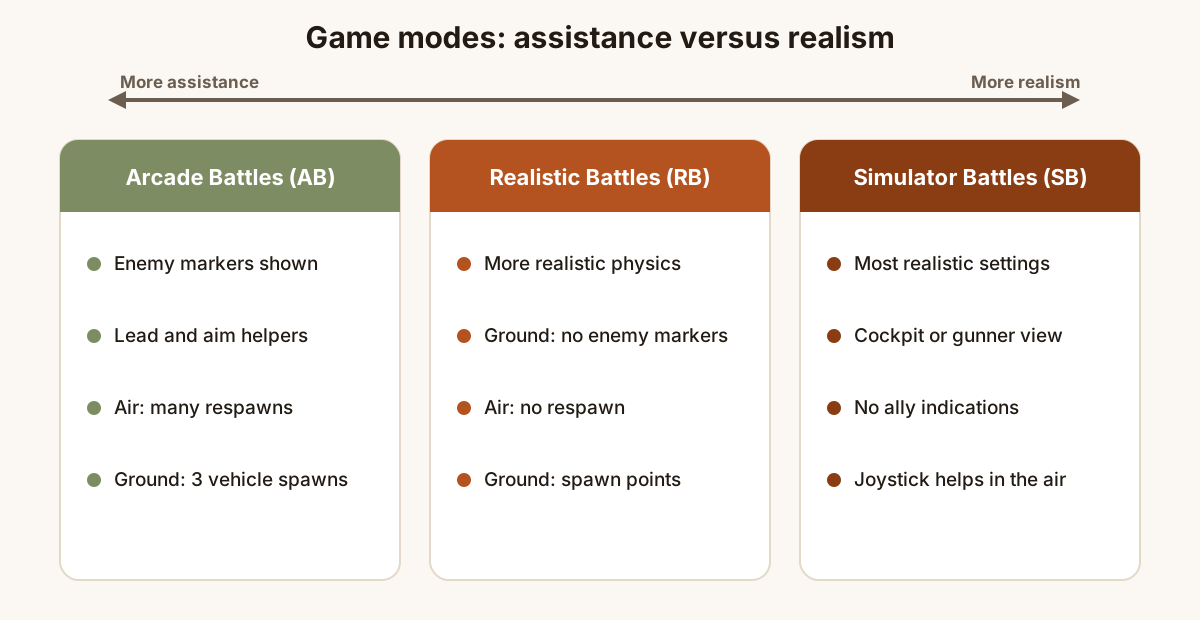
War Thunder has three main difficulty levels, each available for air and ground battles (naval battles have their own set of modes). The mode you choose changes the physics, the on-screen help and how respawns work.
| Mode | What it is like | Good for |
|---|---|---|
| Arcade Battles (AB) | Enemy markers, a lead indicator and, on the ground, an aim assistant that shows where the shell will land and whether it is likely to penetrate. In air AB you can respawn many times and ammunition reloads in flight; ground AB allows up to three vehicle spawns. | Learning maps and vehicles, short sessions. |
| Realistic Battles (RB) | More realistic flight and damage models. In air RB you get one aircraft and no respawn. In ground RB enemies are not marked for you, and you earn spawn points through actions in battle to bring in more vehicles. | Most players once they know the basics. |
| Simulator Battles (SB) | The most realistic settings. Only cockpit or gunner views are available, and there are no ally indications or kill confirmations. | Experienced players, joystick or HOTAS users. |
A practical path is to start in Arcade to learn how vehicles handle and what the maps look like, then move to Realistic once you can spot enemies without the markers.
Battle Rating and matchmaking
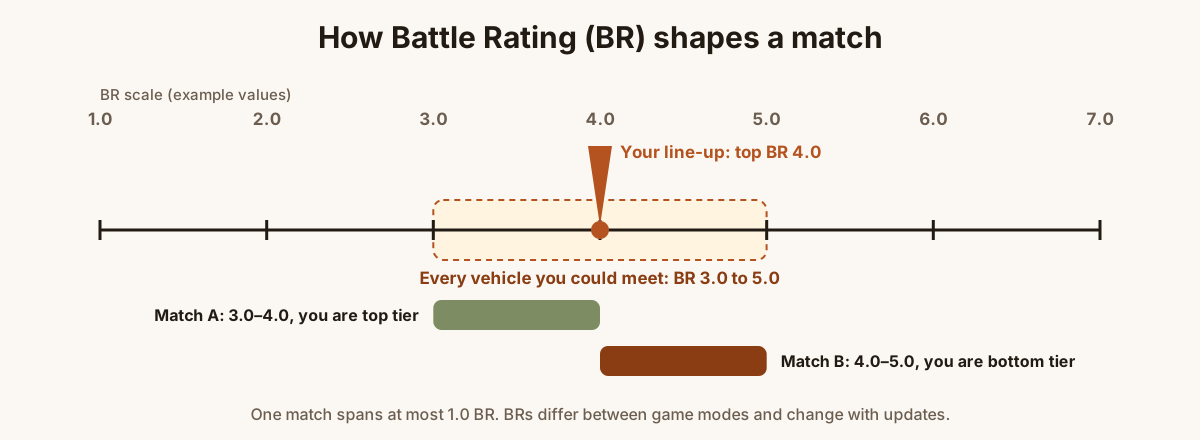
Every vehicle has a Battle Rating (BR), a number that reflects how strong it is in a given mode, such as 3.7 or 6.0. The matchmaker uses BR to decide who you fight. According to the official wiki, a match is formed of line-ups within 1.0 BR of each other, and in ground battles your line-up is rated by the highest BR vehicle in it.
Two practical consequences:
- Your line-up's BR is set by its highest vehicle. Taking one high-BR vehicle alongside low-BR ones means the low-BR vehicles meet stronger opponents. Keep your line-up within a narrow BR range.
- Being “up-tiered” is normal. Sometimes you are the lowest BR in the match. Play more carefully then: support teammates and pick targets you can actually penetrate.
BRs are not fixed. They can differ between Arcade, Realistic and Simulator for the same vehicle, and Gaijin adjusts them in updates. Always check the value shown in the game.
Research, Silver Lions and crews
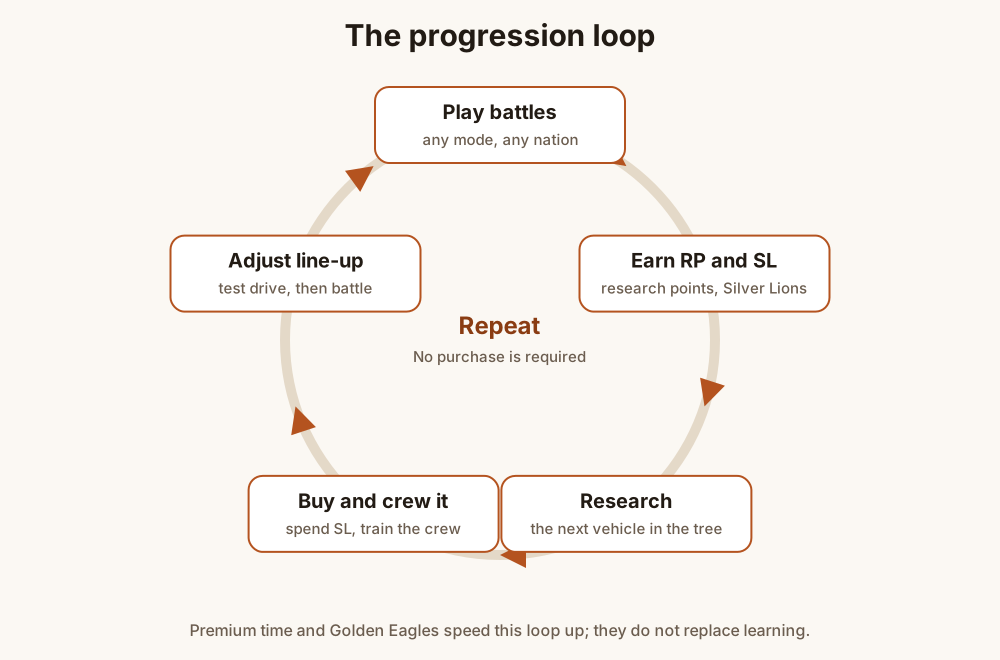
Progression uses a few resources, described in the official wiki's economy article:
- Research Points (RP) are earned in battle and unlock new vehicles and modifications (upgrades such as better parts or new ammunition) for the vehicle you are playing.
- Silver Lions (SL) are the basic in-game currency. You spend them to buy researched vehicles, buy modifications, train crews and pay for repairs.
- Golden Eagles (GE) are the premium currency, bought with real money. The wiki states that spending GE is not required to progress.
- Convertible RP is a pool of research points you can use to speed up research of a vehicle, for a GE cost.
- Crew experience improves crew skills such as reload speed, targeting and vision.
Repair costs
If your vehicle is destroyed, repairing it costs Silver Lions. At low ranks this is small; at higher ranks repair costs can take a large share of your battle reward, so playing recklessly can leave you short of SL. Staying alive longer is therefore both better play and better economy.
Modifications first
New vehicles often arrive “stock”: without upgrades and with basic ammunition. Researching the first mobility, repair and ammunition modifications usually improves a vehicle noticeably. Expect a new vehicle to feel weaker for its first few battles.
Ground battle fundamentals
Most ground battles are about capture points, usually marked A, B and C, and about destroying enemy vehicles. A team wins by holding points or by running the enemy out of tickets or vehicles, depending on the mission. A few habits matter far more than aim:
- Do not cross open ground. Move along buildings, ridges and treelines. A vehicle in the open can be engaged from many angles at once.
- Use hull-down positions. Park behind a ridge so only your turret shows. Many vehicles have thinner lower hulls.
- Stop before you shoot. Guns are far more accurate when the vehicle is not moving.
- Change position after firing. Muzzle flash and your shot give away your position. Reverse into cover and appear somewhere else.
- Aim for crew and ammunition. Knocking out the crew or detonating ammunition ends a fight faster than shooting the thickest plate. Use the in-game protection analysis in the hangar to study where a vehicle's crew and ammunition sit.
- Watch the minimap and listen. Engine and track sounds tell you roughly where enemies are.
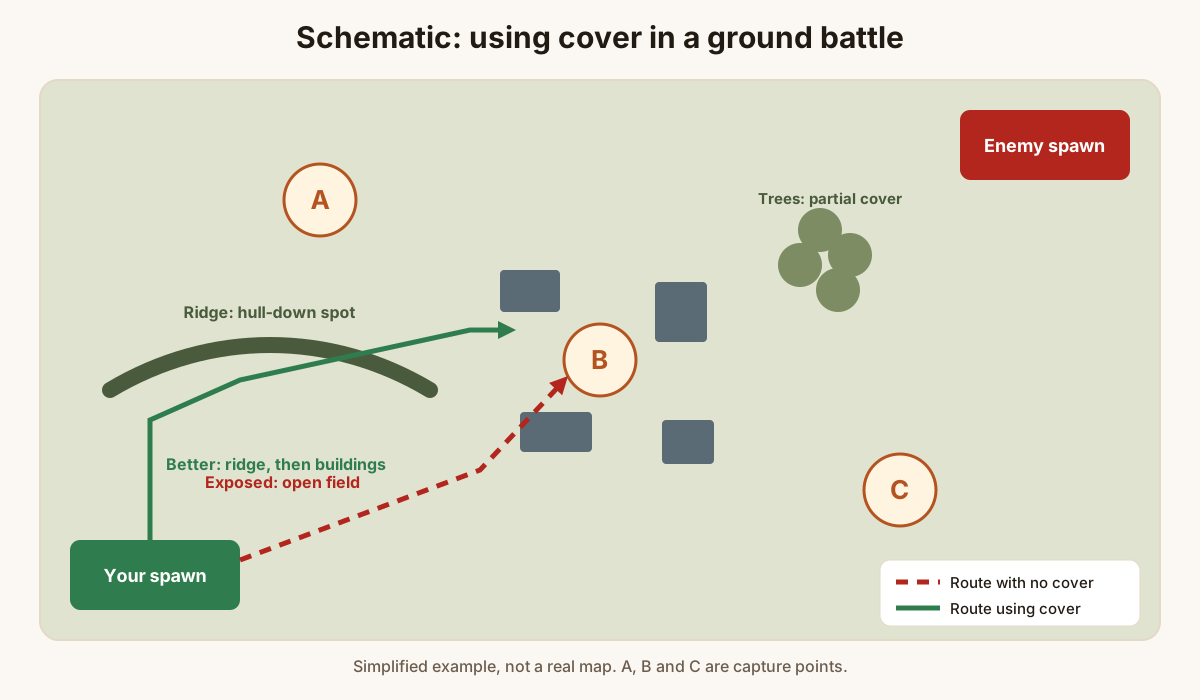
In Realistic ground battles you start with some spawn points and earn more by capturing, spotting, damaging and destroying. They pay for your next vehicle, including aircraft and helicopters. Lighter vehicles usually cost fewer spawn points than heavy ones, and cost also depends on the vehicle's BR relative to the battle.
Armour and angling
Armour works by thickness along the shell's path, not just the nominal plate thickness. A plate tilted away from the incoming shell gives it more steel to travel through. This is basic geometry: line-of-sight thickness equals plate thickness divided by the cosine of the angle from vertical.
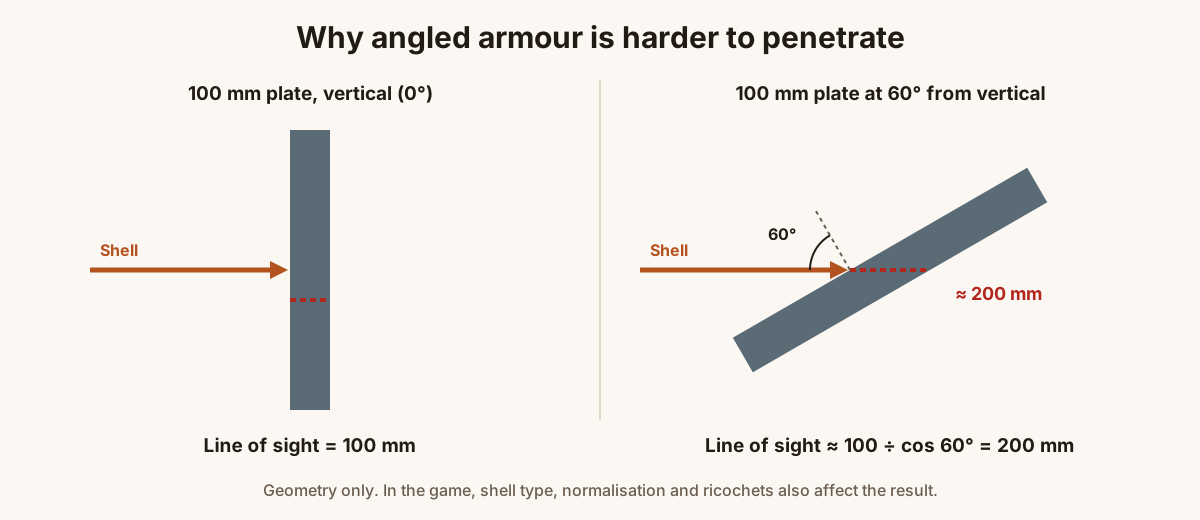
In practice:
- Turning your hull slightly relative to an enemy (often called “angling”) can make your side and front armour more effective. Turning too far exposes your side.
- Some shells, especially many kinetic rounds, can ricochet off steeply sloped armour.
- Weak spots such as gun mantlets, driver's hatches, lower plates and turret rings are where you should aim, and what you should keep hidden.
Ammunition basics
Every gun has one or more shell types, and choosing the right one matters. The names follow real-world ammunition categories:
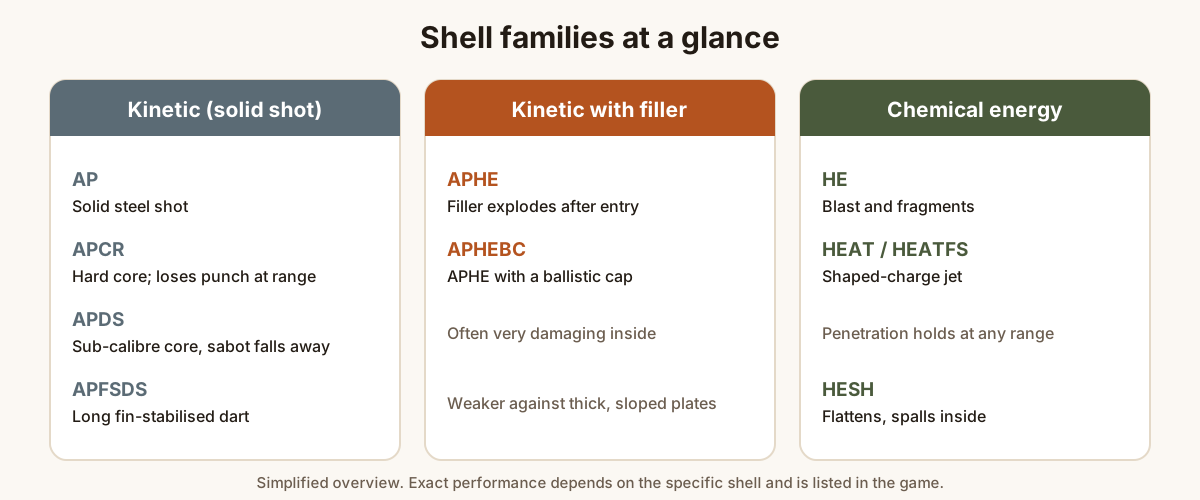
- AP, APCR, APDS, APFSDS: solid kinetic projectiles. They rely on speed and mass. APCR and APDS often penetrate more at close range but lose it faster over distance.
- APHE / APHEBC: armour-piercing shells with an explosive filler that detonates after penetrating. They are very damaging inside a vehicle but struggle against thick sloped armour.
- HEAT / HEATFS: shaped charges. Their penetration does not depend on impact speed, so it does not drop with range.
- HE and HESH: explosive rounds. HE is useful against lightly armoured targets; HESH flattens against the plate and can cause damage behind it.
Look at the penetration table for each shell in the game rather than relying on a general rule. It shows penetration by distance and angle.
Air battle fundamentals
Air combat in War Thunder rewards understanding energy: the combination of altitude and speed. Energy can be converted (dive to gain speed, climb to trade speed for height), but turning hard burns it quickly.
- Climb early, but not blindly. Height lets you choose when to fight. Climbing in a straight line directly toward the enemy is rarely a good idea.
- Know your aircraft's style. Some aircraft turn well; others are fast and heavy and are better at “boom and zoom”: diving on a target, firing and climbing away. Do not fight a better-turning aircraft on its terms.
- Check your six. Many losses come from an enemy you never saw. Look around regularly.
- Converge your guns. Weapon convergence distance is adjustable in the settings. A shorter distance often suits beginners, who tend to fire from too far away.
- Ground attack and bombers have a job too. Destroying ground targets and bases helps win many air battles. Fly with escorts or away from the main fighter fight.
In Realistic air battles you have one aircraft and no respawn, so survival is part of the objective. Returning to an airfield rearms and repairs you.
A note on naval battles
Naval battles are a separate branch with coastal and bluewater vessels. They play more slowly, with long-range gunnery and damage control. Try them once you are comfortable with the basics elsewhere. The rules on this page about BR, research and cover apply there as well.
Spending money: what it does and does not do
War Thunder is free to play, and the official wiki states that spending Golden Eagles is not required to progress. Paid options exist and it helps to know exactly what they do:
| Option | What it does | What it does not do |
|---|---|---|
| Premium account (time-limited) | Increases RP and SL rewards from battles, according to the official wiki. | It does not make you a better player or change your vehicle's performance. |
| Premium vehicles | Ready to use without research, often with better SL/RP earnings. | It does not teach you the game. A high-BR premium bought on day one skips the learning curve and often leads to frustrating matches. |
| Golden Eagles | Buy premium time and vehicles, speed up research and crew training, and buy cosmetics. | They are not required to reach any standard vehicle in the research trees. |
Common beginner mistakes
- Rushing up the tree. Higher ranks bring more complex vehicles and higher repair costs. There is no prize for getting there quickly.
- Mixing BRs in a line-up. One high-BR vehicle drags the whole line-up into harder matches.
- Driving into the open. Most early deaths come from being seen by several enemies at once.
- Shooting while moving. Stop, aim, fire, relocate.
- Ignoring the shell choice. Carrying only the stock round when a better one has been researched.
- Turn-fighting in a heavy fighter. Use your aircraft's strengths instead.
- Judging a vehicle while it is stock. Research the key modifications before you decide it is bad.
A practice routine
This is a suggested structure, not a guarantee of results. Everyone learns at a different pace.
- Session 1: complete the introductory training missions, rebind any controls you dislike and take two or three vehicles for a test drive or test flight.
- Sessions 2–5: play Arcade, in one nation, at the lowest rank. Focus on one skill per session: using cover, stopping before firing, or checking the minimap.
- Once you can spot enemies reliably: try Realistic. Expect to die more at first; that is how you learn to read terrain.
- After each session: think about one death that you could have avoided. What would you do differently?
- Use the hangar tools: study the protection analysis and armour view of the vehicles that keep destroying you.
Try the modes described above
Start in Arcade, practise in test drives and move up when you feel ready. There is no rush and no deadline.
Go to the War Thunder offerPartner linkPartner link: if you register or make a purchase after clicking, DEKAM, s.r.o. may earn a commission. It costs you nothing extra. War Thunder is free to play; in-game purchases are optional.
Sources and how we checked
We checked the game mechanics described here against the official War Thunder wiki and site, consulted in September 2026. Values the game changes often (BRs, rewards, prices) are deliberately not quoted as fixed numbers. Where we could not confirm a detail, we describe it in general terms.
- Official War Thunder website and FAQ: warthunder.com/en/game/faq
- War Thunder Wiki: matchmaking: wiki.warthunder.com/mechanics/matchmaking
- War Thunder Wiki: economy: wiki.warthunder.com/mechanics/basic_economy
- War Thunder Wiki: Arcade Battles: wiki.warthunder.com/gamemode/arcade_battles
- War Thunder Wiki: Realistic Battles: wiki.warthunder.com/gamemode/realistic_battles
- Armour geometry (line-of-sight thickness = thickness ÷ cos angle) is standard trigonometry.
These are ordinary reference links, not partner links. The game changes with every major update: if anything on this page differs from information published by Gaijin Entertainment or by the advertiser, their official information prevails. Spotted an error? See our corrections procedure.
About this guide
This guide was written for kinetor.online and reviewed by Oliver Miller, the site's responsible editor. It contains no reader testimonials, invented ratings or “limited time” pressure; see our editorial policy. All illustrations and diagrams on this page are original drawings made for kinetor.online. They are simplified schematics, not screenshots or models from the game.
War Thunder is a trademark of its owner, the Gaijin Entertainment group. This site is not affiliated with, endorsed by or sponsored by Gaijin Entertainment or the War Thunder brand.
New to the terminology? Read the War Thunder glossary.